
I’ve spent a lot of time, and acquired a lot of scar tissue, in this industry, and if there is one thing I’ve learned, it’s that most people are terrified of looking different. People hug the center of the road because it feels safe. But as Jim Hightower once said,
“There’s nothing in the middle of the road but yellow stripes and dead armadillos.”
When we were building the early versions of PowerShell (back when it was Monad), we had a massive fight over a single word. It seemed trivial to everyone else, but I knew it was a hill worth dying on. It was the fight over the word Cmdlet.
The disagreement wasn’t a matter of wordsmithing; it was a foundational issue about establishing the cognitive contours of the product – how people would think, learn, find things, and form a community. It was an issue of soul.
The Battle for a Word
In the initial prototype of Monad, I referred to what are now called cmdlets as Function Units, which I then shortened to FUs. This abbreviation reflected the Unix smart-ass culture I was embracing at the time. Plus I was developing this in a hostile environment, and my sense of diplomacy was not yet fully operational. 🙂
So, you’d have FUs for processes and FUs for services. We had lots of fun with that! But you can see why we had to change that. Even I knew shipping a Windows Feature full of FUs wasn’t going to fly in Redmond.
I replaced FUs with Cmdlets—short for command-lets. They were small, focused commands. It was descriptive, precise, and technically accurate.
But the documentation team hated it.
They looked at their style guides and their consistency metrics, and they said, “Jeffrey, we need to change this to ‘Command.’ We have to align with the rest of Windows. Users know what a ‘Command’ is. ‘Cmdlet’ is jargon.”
Now, understand the organizational gravity here. The documentation team’s job is to reduce friction by standardizing language. They wanted to smooth off the rough edges. That is their mission. But I realized they were focusing on the wrong kind of friction.
They were arguing that Command was easier to read. I argued that Command was impossible to find.
Command is a generic term. It means everything, so it means nothing.
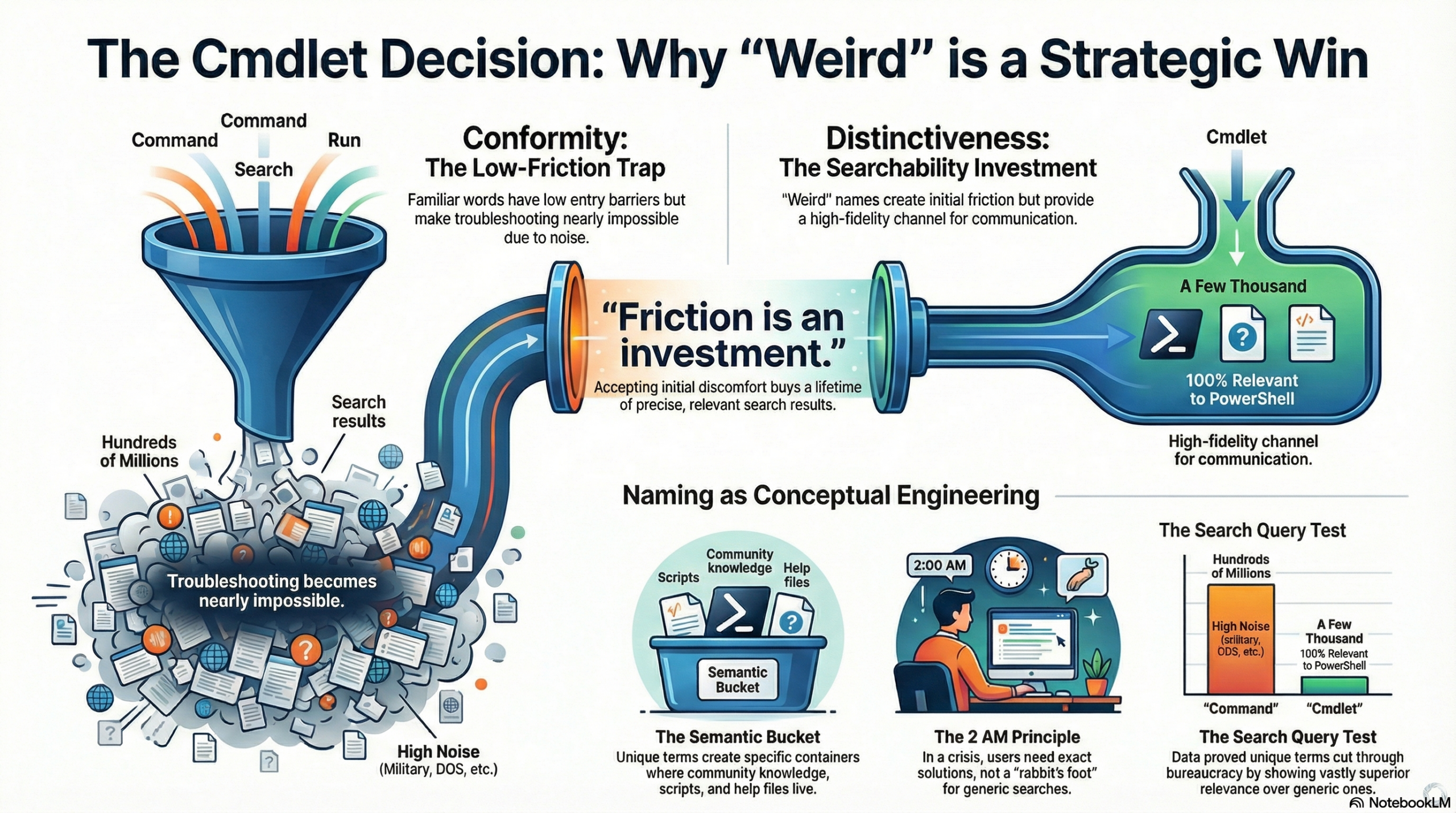
The Search Query Test: Measuring the Noise
I didn’t win this argument with philosophy; I won it with data. I ran a simple test, and I asked the docs team to look at the results.
I went to a search engine and queried the word Command.
The result? Hundreds of millions of hits. Everything from DOS commands to military commands to command and control. It was an ocean of noise.
Then I queried Cmdlet.
The result? A few thousand hits. And every single one of them was relevant to us.
That was the Aha! moment. I realized that by using a unique term, I wasn’t confusing users; I was giving them a flashlight in a dark room. I was guaranteeing that if they searched for Cmdlet, they would find us. They wouldn’t find an OS/360 manual, a VMS DCL thread, or a DOS newsgroup from 1985.
Lesson 1: Conformity vs. Distinctiveness
There is a fundamental trade-off in design that people often ignore. You have to choose between Conformity and Distinctiveness.
- Conformity – the Safe Path: If we had gone with Command, the barrier to entry would have been low. Users would see a familiar word. But the cost of ownership of that knowledge would be astronomical because they couldn’t troubleshoot it.
- Distinctiveness – the Path Less Travelled: By choosing Cmdlet, we raised the barrier to entry. People looked at it and asked, “What the hell is a cmdlet?” It created immediate friction.
But—and this is the key—that friction was an investment. Once you learned the word, you had a high-fidelity channel for communication.
In my view, getting comfortable with being uncomfortable is the price of admission for innovation. We accepted the initial discomfort of a weird name to buy ourselves a lifetime of precise search results.
Lesson 2: Naming is Conceptual Engineering
We often half-ass our naming conventions because we think of naming as marketing or docs. That is a disaster. Naming is a functional requirement. It defines the ontology of your product. It teaches people how to think. It is conceptual engineering.
In a world driven by search engines (and now AI), the uniqueness of your terminology dictates the success of your support ecosystem.
Think of it like a Semantic Bucket.
If I use a common word like Script or Command, I am throwing my user’s problem into the ocean. You might as well ship a rabbit’s foot with your product – your customer is going to need all the luck they can get finding an answer.
By coining Cmdlet, I created a specific semantic bucket. When the community wrote a blog post, or a script, or a help file, they put it in that bucket. Our language defined our community and made it easy for us to find one another and communicate with each other.
This is the 2 AM Principle in action. When an admin is paged at 2 AM because a server is down, they don’t care about the corporate style guide. They care about finding the fix right now. If they Google “Exchange Command fails”, they get garbage. If they Google “Exchange Cmdlet fails”, they get the solution.
Naming is a discoverability feature. If you can’t Google the answer, the feature is broken.
Lesson 3: Judgment and The Bet
Here is the hard truth about leadership: Sometimes you need to go with judgement and sometimes you need to go with data.
The documentation team had a Style Guide. That is a collection of expert judgement calls.
I had search result counts. That is data.
When you are in a deadlock about readability or standards, bringing concrete numbers to the table—even crude ones like search hit counts—is the only way to cut through the bureaucracy.
But ultimately, you cannot A/B test every strategic decision. You have to use judgment to make a bet.
I made the bet that the friction of learning a new word was outweighed by the benefit of precise search results.
I was betting on the long game. I was betting that our users were smart enough to learn a new word if it actually helped them solve their problems.
Conclusion
Today, PowerShell users benefit from a relatively noise-free search environment because of that decision.
When you are building something new, ask yourself: Are you trying to blend in, or are you trying to be found?
Don’t be weird for the sake of being weird. But …
If being weird is a path to success – then have the courage to be weird!
This is a masterclass in design, naming, and leadership.
Key takeaways:
1️⃣ Distinctiveness beats conformity. “Cmdlet” wasn’t familiar, but it created a clear, searchable semantic bucket — a friction worth investing in.
2️⃣ Naming is functional engineering. Words shape how users think, search, and solve problems. Naming isn’t marketing; it’s ontology.
3️⃣ Data + judgment = smart bets. Search hits proved the value, but ultimate decisions require courage and long-term thinking.
In innovation, the safe road rarely leads to clarity. Being “weird” can be the most strategic move you make.
#PowerShell #UXDesign #Innovation #Leadership #NamingMatters
Endorse!
1. PowerShell remains the single most revolutionary technology Microsoft ever shipped.
2. Along with “Don’t be weird for the sake of being weird” (even if I do): “Don’t conform for the sake of conforming.”
3. At the same time, consistency also matters. For example, do you spell it “judgement” or “judgment?” Even if both might be acceptable, do you use both spellings in a single short article? (Or even in a book?)
Consistency does matter which is why PowerShell took away developers control of the CLI parser.
Now WRT spelling – I’m an engineer.
I can’t spell for S***.