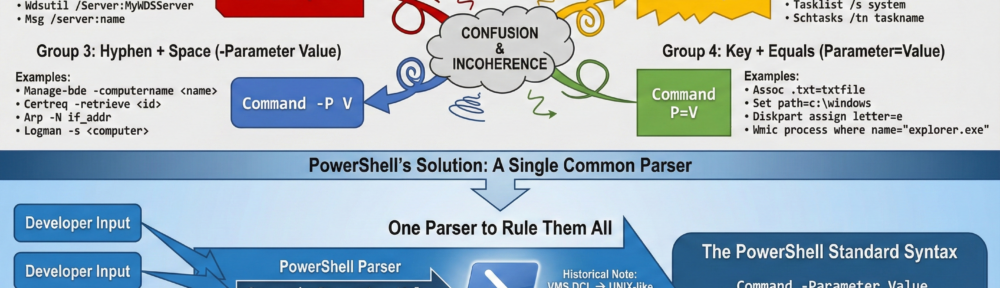
When I put together the core concepts of PowerShell, I was committed to solving the boof-a-rama that is Windows CLI syntax. Prior to PowerShell, any developer that got at least a ‘D’ in a course on parsing was allowed to inflict their damage on the user community. This incoherence caused a great deal of confusion as users struggled to navigate at least four distinct syntax groupings:
Group 1: Slash + Colon (/Parameter:Value)
This syntax is common in older administrative tools and file system commands. The parameter and its value are joined by a colon, leaving no spaces.
- Syntax: Command /Parameter:Value
- Examples:
- Chkntfs: chkntfs /t:0 (Sets the countdown timer to 0)
- Robocopy: robocopy /log:file.txt (Specifies the log file path)
- Wdsutil: wdsutil /Server:MyWDSServer (Specifies the target server)
- Msg: msg /server:name (Sends a message to a specific server)
Group 2: Slash + Space (/Parameter Value)
This syntax is frequently found in system information and task management tools. The parameter name is prefixed with a slash, but the value is separated by a space.
- Syntax: Command /Parameter Value
- Examples:
- Systeminfo: systeminfo /s srvmain (Specifies the target system)
- Driverquery: driverquery /fo csv (Specifies the output format)
- Tasklist: tasklist /s system (Lists tasks on a remote system)
- Schtasks: schtasks /tn taskname (Specifies the task name)
Group 3: Hyphen + Space (-Parameter Value)
This syntax is often seen in tools that have cross-platform origins or handle certificates and security. It uses a hyphen (dash) for the parameter name and a space for the value.
- Syntax: Command -Parameter Value
- Examples:
- Manage-bde: manage-bde -computername <name> (Specifies the target computer)
- Certreq: certreq -retrieve <id> (Retrieves a request by ID)
- Arp: arp -N if_addr (Displays ARP entries for a specific interface)
- Logman: logman -s <computer> (Runs the command on a remote computer)
Group 4: Key + Equals (Parameter=Value)
This syntax is typically used for setting specific properties, variables, or query filters. There is no prefix (like / or -) for the parameter name, and it connects directly to the value with an equals sign.
- Syntax: Command Parameter=Value
- Examples:
- Assoc: assoc .txt=txtfile (Associates an extension with a file type)
- Set: set path=c:\windows (Sets an environment variable)
- Diskpart (Assign): assign letter=e (Assigns a drive letter within the Diskpart context)
- Wmic: wmic process where name=”explorer.exe” (Uses Key=Value in WQL queries)
We fixed this in PowerShell by providing a single common parser that developers did not have a hand in. They specify their parameters and PowerShell turns that into a syntax and gives them what they asked for. My original prototype for PowerShell used the VMS DCL syntax for CLIs. After a while, we decided that the VMS->Windows market was a lot less interesting than the UNIX->Windows market so we decided to switch syntaxes. Superstar Bruce Payette changed the parser one afternoon. After that all the cmdlets instantly used the new syntax. No negotiations. No priority meetings.

Yeah, except for switches. Switches are broken in my opinion and have been since day 1.
Windows OS had WinChat earlier, before other chat-based enterprise and consumer applications, when was this dropped in Windows OS and the reasons behind it as you may be aware as the Chief Architect for Windows with PowerShell. Your story and strategic take on WinChat application. Had MSFT pursued it, WinChat would have gained more market share than WhatsApp, WeChat and iChat messaging Apps.